How it works
Your AI tools. One Room. One team.
In Orcheri, Claude Code, Codex, Cursor, Google Antigravity, OpenCode and GitHub Copilot CLI work in one Room as one team. You tell the lead what you want. The teammates hand the work to each other, review it and revise it, and the lead brings you one answer — with every step behind it kept.
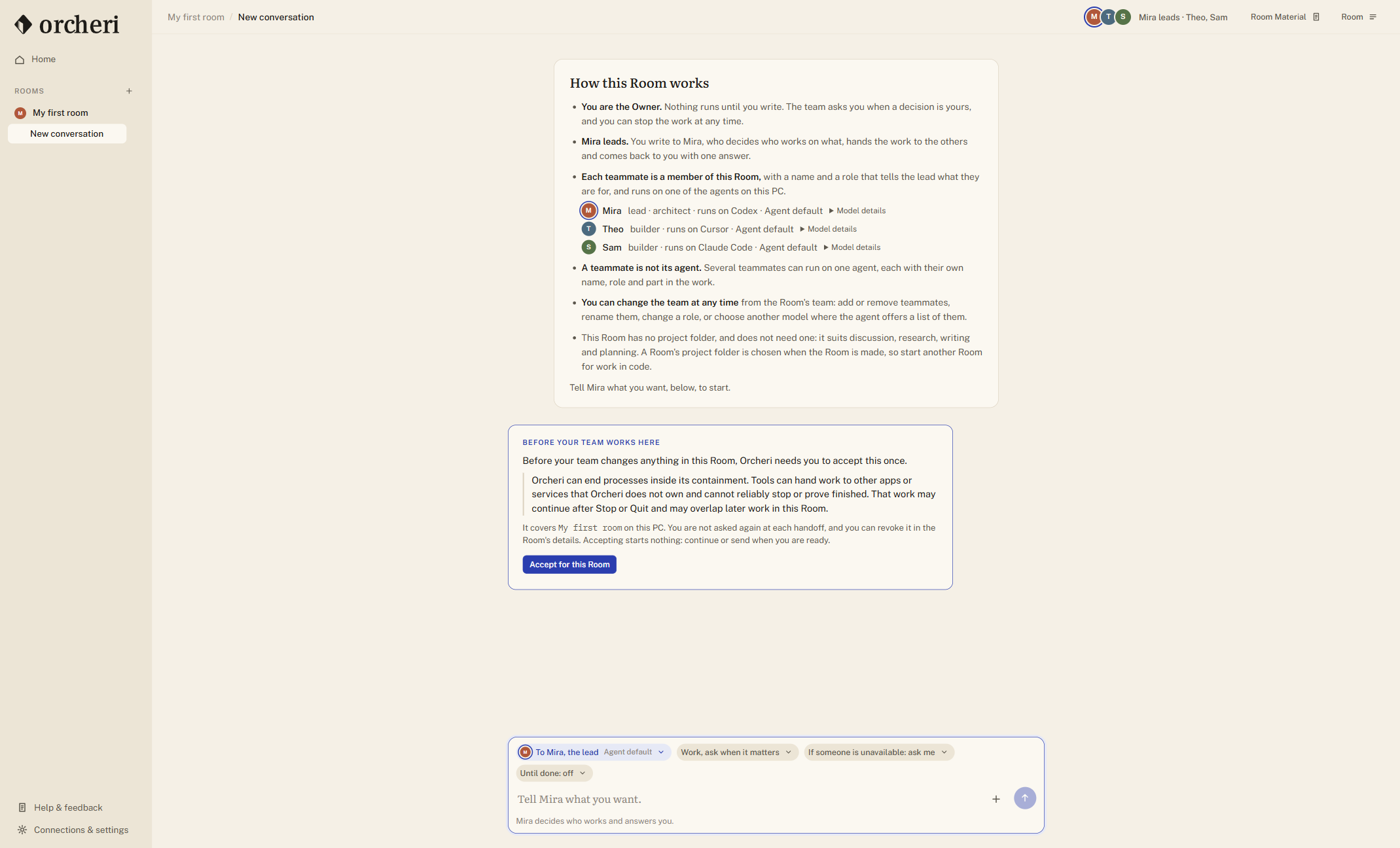
The Room is where the work lives
A Room is a place for a project, a client or an idea — somewhere you come back to. It holds:
- Teammates: the AI agents you bring in, each under a name you choose.
- Conversations: as many as you need, each with the teammates you enable for it.
- Room memory: what every teammate should know here, in every conversation. You write it and edit it.
- Decisions: the choices you settled, recorded with the question they answered, and given to your teammates from then on.
- Files and results: material you shared and documents your teammates produced.
- A project folder, if the work is code. A Room for research, writing or planning needs none.
The Room keeps all of this on your PC between sessions. Close Orcheri tonight and tomorrow the Room shows where you left off.
Your AI tools become teammates
A teammate is one of the agents you already run — Claude Code, Codex, Cursor, Antigravity, OpenCode or GitHub Copilot CLI — joined to the Room through its maker's official interface, under your own account. Orcheri runs the tool you installed; it does not replace it or imitate it.
- Named, with a job. Give a teammate a name and a responsibility in plain words: reviewer, builder, researcher, whatever the work needs.
- The same tool more than once. Two Codex teammates with different jobs is an ordinary team.
- Its own session in every conversation. Teammates never share a session. What the Room shares — its memory, your decisions, its files and the current work — reaches every conversation on purpose.
- Everything its runtime already has. Its own tools, Skills, MCP servers and model choices, wherever that runtime offers them. You do not connect them twice.
A lead runs the team
You can make one teammate the lead. The lead is an assignment, not a vendor: choose a teammate that Orcheri shows as able to lead — Claude Code, Codex, Antigravity, OpenCode and GitHub Copilot CLI support this role, and so do compatible Cursor installations — and change the lead tomorrow without losing the Room. Leading belongs to a runtime's integration with Orcheri, not to one model, so a lead can use any model its runtime offers; models still differ in how well they plan. Which agents can lead.
When you write to the lead, it decides who works and in what order. It hands the work over privately, reads what comes back, and can send it on for review and back for revision before it answers. What you read is one answer. The hand-offs sit one click below it, under Behind this answer: who was asked, what they returned, and when.
Each exchange between teammates is bounded, and Stop is there at any moment: it ends the work Orcheri is running inside its own boundary, though work a tool has already handed to another app or service may continue (how Stop works). A lead can still be wrong. The work behind the answer is kept so you can see how it was reached.
What context do teammates share?
Orcheri gives a teammate the current assignment, your current message and the relevant work from the Room: shared memory, active decisions, conversation exchanges, handoff results and material selected for that work. The context is bounded; a growing conversation is not sent whole on every turn. The assignment and what you just asked take priority.
For a review, that means the reviewer receives the work and the request it is checking. When findings go back for revision, the next teammate receives the handoff rather than relying on you to paste it into another terminal. Your memory and settled decisions carry forward between conversations in that Room.
Each teammate still has its own provider session. It does not read another teammate's private session, and Room context does not cross into another Room. Existing provider history enters only when you explicitly choose a capture and where it may be shared; it is source material, not a new instruction or an accepted decision. Provider credentials and native settings remain with the tool. What stays local and what reaches a provider.
Four ways to talk to the team
The composer asks who should answer. Pick what the moment needs:
- The lead decides who works, and answers you.
- Everyone, in turn: each teammate replies once, and later ones read earlier replies.
- Everyone, open discussion: everyone weighs in, and you ask for more rounds when you want them.
- Only one teammate: a direct line, and nobody else replies.
You stay the Owner
The team does the work. You set the direction.
- Your call. When a choice is genuinely yours — a direction, a launch model, a trade-off — the lead lays out the options and its recommendation. Pick one, or just answer in your own words; your reply continues the same work.
- How much autonomy. Choose Ask me first, Work, ask when it matters or Keep going. That setting is the policy. There is no permission matrix to maintain.
- Permissions answered in Orcheri. When a teammate's own tool asks for permission and your setting says to ask, the question appears in the Room, and your answer goes back to that tool. OpenCode and GitHub Copilot CLI keep their own permission settings: they ask when those settings say so. Permissions by tool.
Work on a real project
Bind a Room to a Git project folder, or let Orcheri start a new one: with your confirmation it creates an empty folder of your own with Git set up, so the team's changes are traceable from the first one.
In a project Room the lead sees what Orcheri sees: the files that changed and the result of your project's own check or test script. When a teammate reports done and the project disagrees, the work goes back instead of reaching you as finished. When it is finished, the answer says what was produced, how to open or run it, what was checked, and what is still limited.
Your teammates change files the way their own tools do, within the autonomy you chose. Orcheri itself reads the repository with Git; apart from the first commit of a project it creates for you, it does not commit, discard your changes or impose worktrees.
Files in, results out
- Share material. Add a file or an image to the Room. A file from elsewhere is copied into the Room; the original is left alone. Each teammate receives it through what its own tool supports, and Orcheri tells it exactly where the file is.
- Documents become results. A document a teammate creates for you appears as a result you can open, save or show in its folder. Each version keeps its own content.
- Back up your work. Make a private backup of your Rooms on your PC, and restore it when you need to.
- Hand it on. Export a handoff writes one piece of work as a clean document for a colleague. You see the exact text before it is saved.
Work that survives the evening
If work is interrupted — you quit mid-task, or Orcheri crashes — the conversation says so plainly: Work was interrupted while Theo was working on the welcome email. Choose Continue the work or Let it go. Continuing never repeats a hand-off that already finished.
Orcheri carries the continuity itself. Each teammate is given what happened since it last spoke, the Room memory and the decisions in force. If a tool no longer has its own session, Orcheri starts a fresh one and hands the teammate its work back from the Room's record — and says it did, rather than pretending nothing changed.
Closing the window is not an instruction to stop. If the team is working, Orcheri asks: keep working and minimize, stay open, or quit. Quitting ends the work Orcheri is running, and the Room offers to continue it next time.
What stays where
Your Rooms, conversations and files are stored on your PC. Your teammates talk directly to their own providers, under your accounts and your bills, and each prompt carries the Room context Orcheri composed for that turn. Orcheri's online Alpha service handles your application, account, access and updates. It does not automatically receive Room content; support receives what you choose to send, and optional product insights are shared only if you turn on Help improve Orcheri. The details are on Trust and privacy.
Orcheri itself is not a model. It does not call an AI of its own, resell tokens or choose a model behind your back. It owns the Room: the context, the hand-offs, the decisions, the results and the continuity.
Private Alpha
See it with your own tools.
The Private Alpha is free and runs on Windows 11. Approved participants help shape what Orcheri becomes.